Chapter 7: データの取得
データベースが用意できたので,いよいよダッシュボードへ実データを流し込みます。この章では Server Components でのデータ取得パターンやウォーターフォールの避け方など,Next.js ならではのポイントを整理します。
この章で学ぶこと
- データ取得のアプローチ:API,ORM,SQL など
- Server Components を使ってバックエンドリソースにより安全にアクセスする方法
- ネットワーク・ウォーターフォールとは何か
- 並列データ取得を JavaScript のパターンで実装する方法
データ取得方法の選択
API レイヤー
API は,アプリケーションコードとデータベースの中間に位置するレイヤーです。次のような場合に API を使います。
- サードパーティのサービスが API を提供している場合
- クライアントからデータを取得する必要があり,データベースのシークレットをクライアントに晒さないためにサーバー上で動く API レイヤーを用意したい場合
Next.js では Route Handlers を使って API エンドポイントを作成できます。
データベースクエリ
フルスタックアプリケーションでは,データベースとやり取りするロジックを書く必要があります。Postgres のようなリレーショナルDBでは,SQL か ORM を使います。
データベースクエリが必要になるのは次のような場面です。
- API エンドポイントを作成するとき(DB とやり取りするロジックを書く必要がある)
- React Server Components(=サーバーでデータ取得)を使う場合,API レイヤーを省略し,クライアントにシークレットを晒さずに DB を直接クエリできます
Server Components でデータ取得
Next.js のアプリケーションはデフォルトで React Server Components を使用します。Server Components でのデータ取得には,次の利点があります。
- Server Components は JavaScript の Promise をネイティブに扱えるため,
useEffectやuseState,外部のデータ取得ライブラリを使わずにasync/awaitで非同期処理を記述できる - Server Components は サーバーで実行されるため,重いデータ取得やロジックをサーバー側に留め,結果だけをクライアントへ送れる
- サーバー上で実行されるので,追加の API レイヤーなしに DB を直接クエリでき,余分なコードの記述・保守が不要になる
SQL を使う
このダッシュボードアプリでは,postgres.js ライブラリと SQL を使ってクエリを書きます。理由は以下のとおりです。
- SQL はリレーショナルDBの事実上の標準(多くの ORM は内部で SQL を生成)
- SQL の基礎理解は,リレーショナルDBの根本を学べるため,他ツールにも応用しやすい
- SQL は柔軟で,必要なデータだけをピンポイントに取得・操作できる
- postgres.js は SQL インジェクション対策が組み込まれている
SQL が初めてでも心配いりません。必要なクエリは用意済みです。
/app/lib/data.ts を開くと,postgres を使っていることが分かります。sql 関数でデータベースをクエリできます。
import postgres from 'postgres';

const sql = postgres(process.env.POSTGRES_URL!, { ssl: 'require' });

// ...
sql は サーバー上のどこでも(Server Component 内など)呼び出せます。ただしコンポーネントの見通しをよくするため,このチュートリアルでは データ取得はすべて data.ts に集約し,必要な関数をコンポーネントにインポートする形にしています。
注:第6章で独自のDBプロバイダを使った場合は,
/app/lib/data.tsのクエリをプロバイダに合わせて調整してください。
ダッシュボード概要ページのデータ取得
データ取得の方法が分かったところで,ダッシュボードの概要ページで実際にデータを取得してみましょう。/app/dashboard/page.tsx を開き,下のコードを貼り付けて構造を確認してください。
import { Card } from '@/app/ui/dashboard/cards';
import RevenueChart from '@/app/ui/dashboard/revenue-chart';
import LatestInvoices from '@/app/ui/dashboard/latest-invoices';
import { lusitana } from '@/app/ui/fonts';

export default async function Page() {
  return (
    <main>
      <h1 className={`${lusitana.className} mb-4 text-xl md:text-2xl`}>
        Dashboard
      </h1>
      <div className="grid gap-6 sm:grid-cols-2 lg:grid-cols-4">
        {/* <Card title="Collected" value={totalPaidInvoices} type="collected" /> */}
        {/* <Card title="Pending" value={totalPendingInvoices} type="pending" /> */}
        {/* <Card title="Total Invoices" value={numberOfInvoices} type="invoices" /> */}
        {/* <Card
          title="Total Customers"
          value={numberOfCustomers}
          type="customers"
        /> */}
      </div>
      <div className="mt-6 grid grid-cols-1 gap-6 md:grid-cols-4 lg:grid-cols-8">
        {/* <RevenueChart revenue={revenue}  /> */}
        {/* <LatestInvoices latestInvoices={latestInvoices} /> */}
      </div>
    </main>
  );
}
ここでは,意図的に多くの部分がコメントアウトされています。ポイントは次のとおりです。
- この
pageは async な Server Component です。つまり,awaitを使ってデータを取得できます。 - データを受け取るコンポーネントは
<Card>,<RevenueChart>,<LatestInvoices>の3つ(現状コメントアウト,中身も未実装)。
<RevenueChart /> 用のデータ取得
data.ts から fetchRevenue をインポートし,コンポーネント内で呼び出します。
import { Card } from '@/app/ui/dashboard/cards';
import RevenueChart from '@/app/ui/dashboard/revenue-chart';
import LatestInvoices from '@/app/ui/dashboard/latest-invoices';
import { lusitana } from '@/app/ui/fonts';
import { fetchRevenue } from '@/app/lib/data';

export default async function Page() {
  const revenue = await fetchRevenue();
  // ...
}
次に以下を行います。
<RevenueChart />をアンコメント- コンポーネントファイル(
/app/ui/dashboard/revenue-chart.tsx)を開き,中のコードもアンコメント http://localhost:3000を確認し,売上のチャートが表示されることを確認
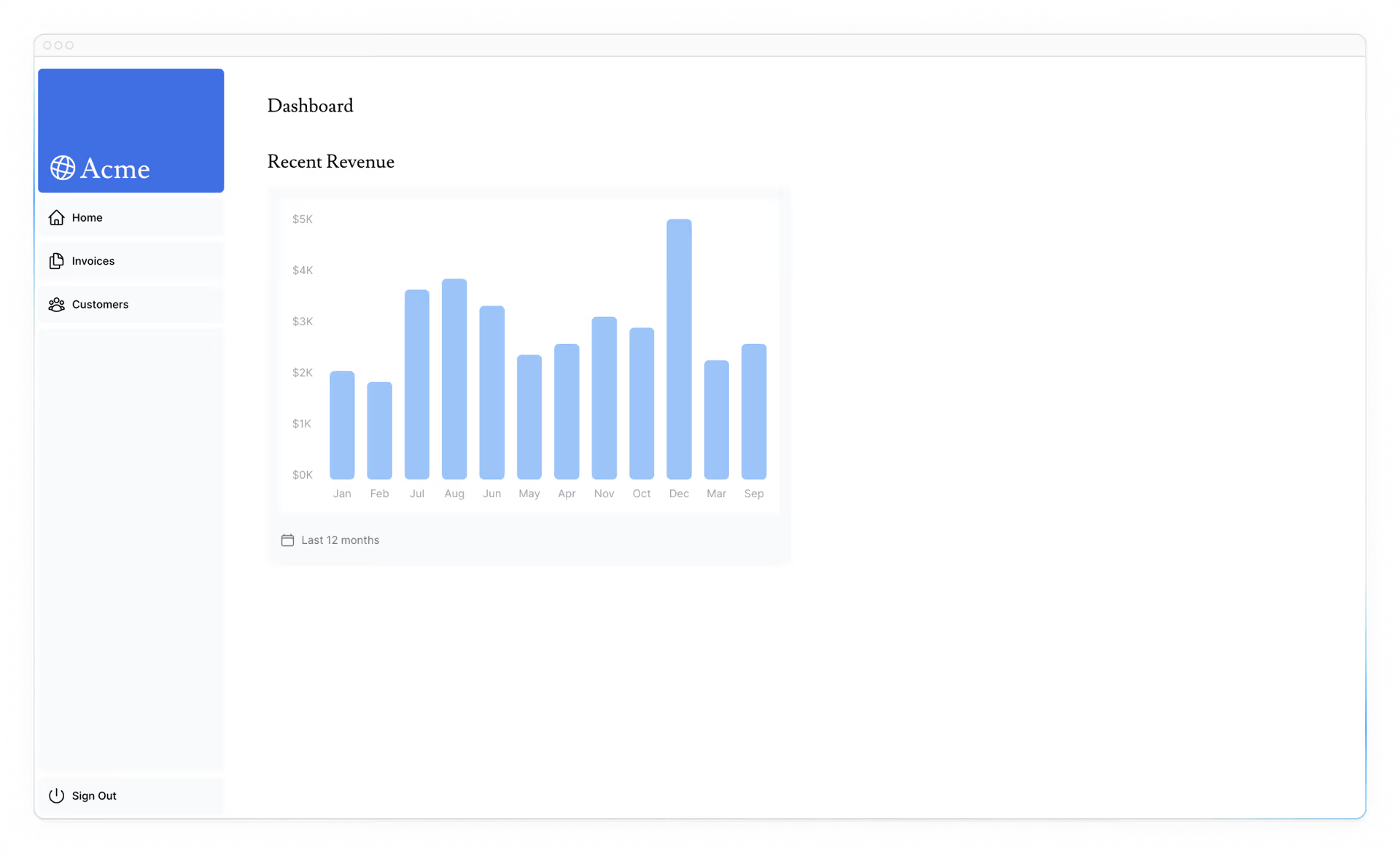
<LatestInvoices /> 用のデータ取得
LatestInvoices には,最新5件の請求書(日時の降順)が必要です。
全請求書を取得して JavaScript でソートしてもよいのですが,アプリが大きくなると 転送データ量が増え,クライアントでの処理も重くなります。そこで,SQL で最初から最新5件だけを取得します。data.ts の該当クエリ例は次のとおりです。
// 最新5件を日時降順で取得
const data = await sql<LatestInvoiceRaw[]>`
  SELECT invoices.amount, customers.name, customers.image_url, customers.email
  FROM invoices
  JOIN customers ON invoices.customer_id = customers.id
  ORDER BY invoices.date DESC
  LIMIT 5`;
ページ側では fetchLatestInvoices をインポートします。
import { Card } from '@/app/ui/dashboard/cards';
import RevenueChart from '@/app/ui/dashboard/revenue-chart';
import LatestInvoices from '@/app/ui/dashboard/latest-invoices';
import { lusitana } from '@/app/ui/fonts';
import { fetchRevenue, fetchLatestInvoices } from '@/app/lib/data';

export default async function Page() {
  const revenue = await fetchRevenue();
  const latestInvoices = await fetchLatestInvoices();
  // ...
}
そのうえで <LatestInvoices /> をアンコメントし,コンポーネント側(/app/ui/dashboard/latest-invoices)の該当コードもアンコメントします。ローカルを確認すると,DB から 最新5件のみ が返っているはずです。DB を直接クエリする利点が見えてきたでしょう。
<Card> コンポーネント用のデータ取得
<Card> には次の情報を表示します。
- 回収済み(paid)請求額の合計
- 保留中(pending)請求額の合計
- 請求書の総数
- 顧客の総数
全データを取ってきて Array.length で数える方法もありますが,SQL を使えば 必要な集計だけ を返せます。たとえば次のようなクエリです。
const invoiceCountPromise = sql`SELECT COUNT(*) FROM invoices`;
const customerCountPromise = sql`SELECT COUNT(*) FROM customers`;
ここでインポートすべき関数は fetchCardData です。返り値を 分割代入 して取り出してください。
import { Card } from '@/app/ui/dashboard/cards';
import RevenueChart from '@/app/ui/dashboard/revenue-chart';
import LatestInvoices from '@/app/ui/dashboard/latest-invoices';
import { lusitana } from '@/app/ui/fonts';
import {
  fetchRevenue,
  fetchLatestInvoices,
  fetchCardData,
} from '@/app/lib/data';

export default async function Page() {
  const revenue = await fetchRevenue();
  const latestInvoices = await fetchLatestInvoices();
  const {
    numberOfInvoices,
    numberOfCustomers,
    totalPaidInvoices,
    totalPendingInvoices,
  } = await fetchCardData();

  return (
    <main>
      <h1 className={`${lusitana.className} mb-4 text-xl md:text-2xl`}>
        Dashboard
      </h1>
      <div className="grid gap-6 sm:grid-cols-2 lg:grid-cols-4">
        <Card title="Collected" value={totalPaidInvoices} type="collected" />
        <Card title="Pending" value={totalPendingInvoices} type="pending" />
        <Card title="Total Invoices" value={numberOfInvoices} type="invoices" />
        <Card
          title="Total Customers"
          value={numberOfCustomers}
          type="customers"
        />
      </div>
      <div className="mt-6 grid grid-cols-1 gap-6 md:grid-cols-4 lg:grid-cols-8">
        <RevenueChart revenue={revenue} />
        <LatestInvoices latestInvoices={latestInvoices} />
      </div>
    </main>
  );
}
これで,ダッシュボードの概要ページに必要なデータが一通り取得できました。
リクエスト・ウォーターフォールとは?
ただし,注意点が2つあります。
- データリクエストが互いに待ち合ってしまい,ウォーターフォール(滝状の連鎖) になっている
- Next.js はデフォルトで 静的レンダリング(Static Rendering) を行うため,データが変わっても即座に反映されない(詳しくは次章)
ここではまず 1 を説明します。
ウォーターフォールとは,前のリクエストが終わるまで次のリクエストが開始できない連鎖のことです。
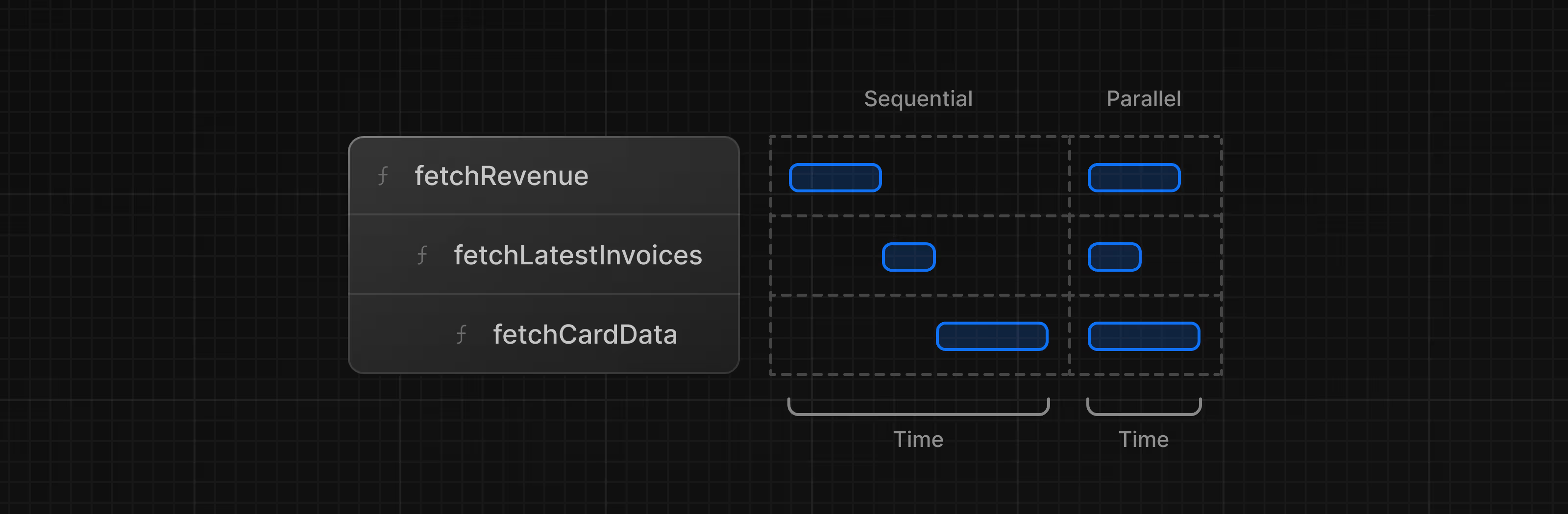
たとえば以下のように,fetchRevenue() の完了を待ってから fetchLatestInvoices() が始まり…という順番になっていると,直列に時間がかかります。
const revenue = await fetchRevenue();
const latestInvoices = await fetchLatestInvoices(); // fetchRevenue() の完了待ち
const {
  numberOfInvoices,
  numberOfCustomers,
  totalPaidInvoices,
  totalPendingInvoices,
} = await fetchCardData(); // fetchLatestInvoices() の完了待ち
もちろん 意図的に こうする場合もあります(例:ユーザーIDを取得してからフレンド一覧を取得する,など)。 しかし,意図せずに直列化してしまうと パフォーマンスが悪化します。
並列データ取得
ウォーターフォールを避ける一般的な方法は,すべてのデータ取得を同時に開始(並列化)することです。
JavaScript では,Promise.all() や Promise.allSettled() を使って 同時に複数の Promise を開始できます。たとえば data.ts の fetchCardData() では次のようにしています。
export async function fetchCardData() {
  try {
    const invoiceCountPromise = sql`SELECT COUNT(*) FROM invoices`;
    const customerCountPromise = sql`SELECT COUNT(*) FROM customers`;
    const invoiceStatusPromise = sql`SELECT
         SUM(CASE WHEN status = 'paid' THEN amount ELSE 0 END) AS "paid",
         SUM(CASE WHEN status = 'pending' THEN amount ELSE 0 END) AS "pending"
         FROM invoices`;

    const data = await Promise.all([
      invoiceCountPromise,
      customerCountPromise,
      invoiceStatusPromise,
    ]);
    // ...
  }
}
このパターンの利点は次のとおりです。
- すべての取得を同時に開始でき,ウォーターフォールより高速
- ライブラリやフレームワークを問わず使える 素の JavaScript パターン
ただし欠点もあります。一部のリクエストだけ極端に遅い場合,その完了待ちで全体が遅くなる可能性があります。この点については 次章 で詳しく扱います。